
Your Cart is Empty
CANADA FREE SHIPPING WITH ORDER MORE THAN 100$ BEFORE TAXES *
CANADA FREE SHIPPING WITH ORDER MORE THAN 100$ BEFORE TAXES *
-
Login
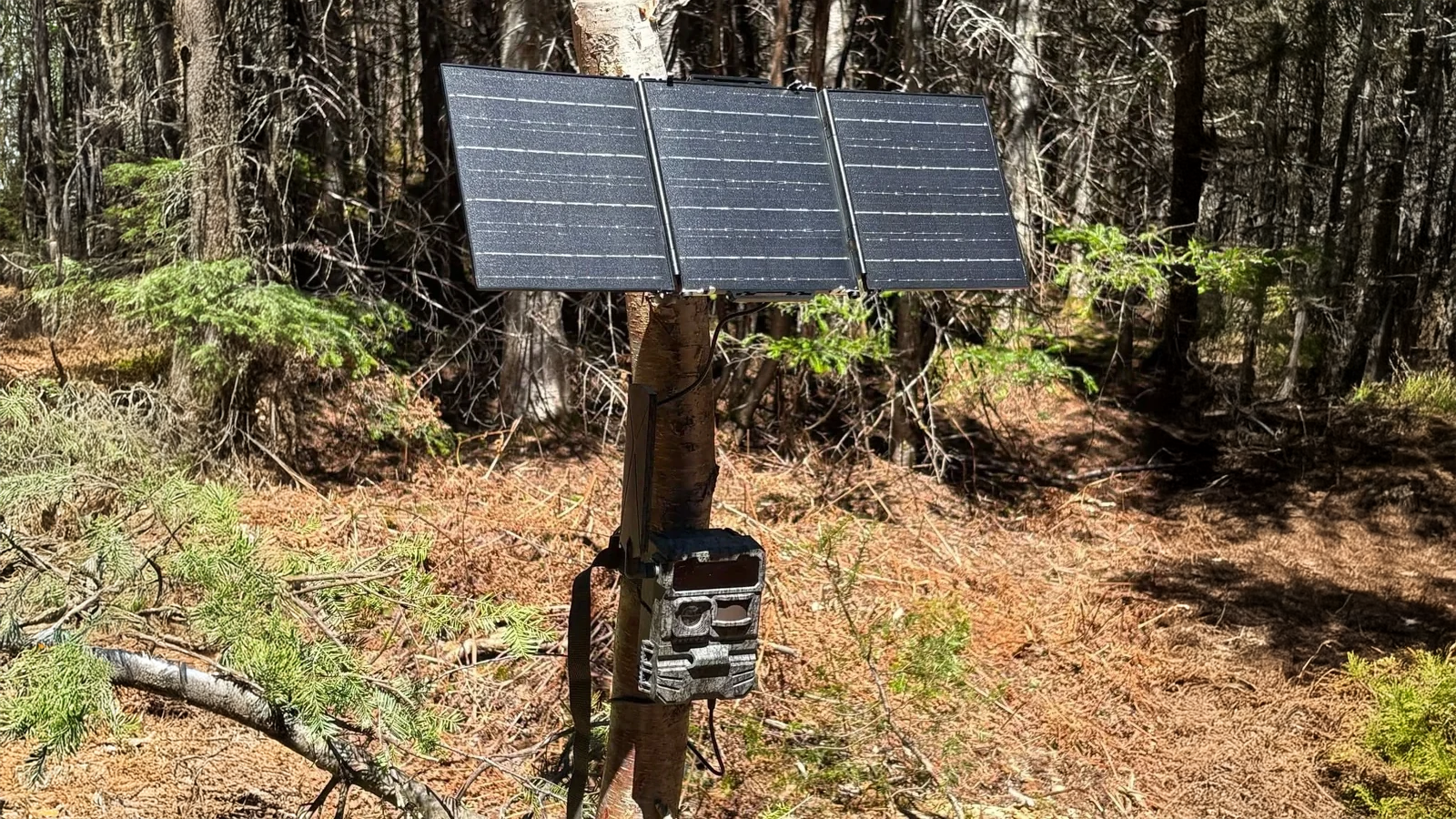

Replacing batteries or recharging a battery pack can mean a long trip to your hunting grounds. A few adjustments can help you reduce those visits while keeping an eye on the animal activity that matters to you.
Battery life depends on several factors: settings, the number of triggers, cellular signal quality, power supply and temperature. Here are the main things to check.
A cellular camera uses power to remain available for remote commands. Your remote control mode can therefore have a significant impact on battery life.
If you do not need an immediate response, choose a delayed or less frequent remote control mode.
For a camera you check only occasionally, keeping real-time remote control enabled may not be necessary.
The trade-off: some commands will take longer to execute. Remote command timing and the transmission of motion-triggered photos are separate functions. Check the settings available for your model.
On-demand photos and videos, as well as HD file transfers, use the camera and its cellular connection.
Use these features when you need to check a situation or see a specific detail. Avoid making unnecessary requests.
On the ACCESS, use Live Video as needed and keep viewing sessions short.
A camera used to confirm animal activity does not necessarily need the same settings as one used to record animal behaviour.
Depending on the options available on your model:
Choose photos if they meet your monitoring needs.
Shorten video recordings.
Limit the number of photos taken per trigger.
Adjust the delay between triggers when animals spend extended periods in front of the camera.
In a busy location, repeated captures can quickly increase power consumption.
A longer delay can mean missing animals that pass shortly after one another. Adjust it to suit the location instead of using the same setting everywhere.
Repeated images with no visible animal may indicate a positioning issue. Each unnecessary trigger creates a recording and, on a cellular camera, may also result in a transmission.
On site:
Clear grass and small branches near the motion sensor.
Mount the camera on a stable support.
Avoid pointing it toward the rising or setting sun whenever possible.
Adjust detection sensitivity to suit the surroundings.
Do not automatically set sensitivity to its lowest level. Test the camera to confirm that it still detects movement in the area you want to monitor.
A weak or unstable connection can prolong communication attempts and increase power consumption.
Before leaving the camera in the field:
Check that the antenna is securely attached and in good condition.
Check the network indicators.
Confirm that a photo arrives in the app.
Try a slightly different location if the camera struggles to connect.
Moving the camera a short distance can sometimes improve reception. Check the signal at its final location, not just at home.
An ageing battery, partially depleted batteries or a poor electrical contact can shorten operating time.
Before installation:
Fully charge rechargeable batteries.
If using replaceable batteries, install a fresh set of the same type.
Check the contacts, cables and connectors.
Confirm that any external power supply is compatible with your camera.
The voltage and electrical specifications must match the model’s requirements.
A higher-capacity external battery can reduce maintenance visits, but it will not resolve excessive power consumption caused by settings or a poor connection.
A solar panel can help maintain the battery’s charge, provided it receives enough sunlight and is suitable for your setup.
Choose an open location and check:
Sun exposure throughout the day.
Shade from trees and branches.
Any buildup of snow, leaves or dirt.
The condition of the cable and connections.
Having a solar panel does not guarantee unlimited power. If the camera uses more energy than the panel supplies, the battery will continue to drain.
Cold weather can reduce the available capacity of batteries. A setup that runs for a long time in the fall may require more attention in winter.
Before cold weather arrives:
Check the battery’s charge and condition.
Use a power solution suited to the expected temperatures.
Reduce unnecessary camera activity.
Allow extra battery capacity for days with limited sunlight.
For rechargeable batteries, also follow the manufacturer’s charging temperature limits.
In the app, check the battery level alongside the date of the last synchronization. An old reading does not confirm the current state of the power supply.
If the charge drops suddenly, look at what has changed: more triggers, more videos, repeated remote requests, lower temperatures or an unstable connection.
Change one setting at a time to better understand its effect.
The ACCESS-L prioritizes lower power consumption and extended monitoring. The ACCESS offers features such as GPS and Live Video for those who want more functionality.
With either model, actual battery life depends on usage and field conditions.
If your camera’s battery drains unusually quickly, have the camera model, power supply type, remote control settings and approximate number of photos or videos recorded each day ready.
Contact Huntdoor support. We can help you identify the checks best suited to your setup.
Comments will be approved before showing up.
